Scrapbook against the Mac DAM and cataloging market
Compared to the most widely used visual asset managers on Mac in 2026. Indicative prices for the Europe zone, vendor sources.
| Feature | Scrapbook | Adobe Bridge | Lightroom Classic | Photo Mechanic | Excire Foto |
|---|---|---|---|---|---|
| Model | ✓ One-time purchase | CC subscription | Subscription | One-time purchase | One-time purchase |
| Price | €29.99 for life | ~€12/month (with Photoshop) | ~€144/year | ~€220 | ~€99 (Pro ~€149) |
| Originals never modified | ✓ Strict | ⚠️ writes XMP | ✗ | ✓ | ⚠️ optional |
| 100% local AI (tags, faces, similarity) | ✓ Vision.framework | ✗ Adobe Sensei cloud | ⚠️ partial / cloud | ✗ | ✓ |
| Natural language search | ✓ Beach sunset dog… | ✗ | ✗ | ✗ | ⚠️ by keyword |
| Duplicate detection by perceptual hash | ✓ Even cropped / recompressed | ✗ | ✗ | ✗ | ⚠️ similarity |
| Multi-format import from competitor catalogs (Lightroom, Bridge, Capture One…) | ✓ .lrcat / XMP / .ivc / CSV | ⚠️ XMP / IPTC | ⚠️ XMP only | ⚠️ XMP / IPTC | ⚠️ XMP |
| Direct iView Media Pro import (.ivc) | ✓ Full transcription | ✗ | ✗ | ✗ | ✗ |
| Open export (SQLite catalog + XMP sidecars) | ✓ SQLite + XMP | ⚠️ XMP | ⚠️ XMP only | ⚠️ XMP / IPTC | ⚠️ XMP |
| SHA-256 integrity monitoring | ✓ DAM discipline | ✗ | ✗ | ✗ | ✗ |
| GPS map view (map / satellite / hybrid) | ✓ Interactive | ✗ | ✓ | ✗ | ✗ |
| MP4 slideshow export (H.264 hardware) | ✓ | ✗ | ⚠️ Slideshow | ✗ | ✗ |
| Automatic color palette (HEX, CMYK, RAL, .ase) | ✓ Unique | ✗ | ✗ | ✗ | ✗ |
| 3D preview (USDZ, OBJ, DAE, STL…) | ✓ | ✗ | ✗ | ✗ | ✗ |
| Drag & drop to pro apps (InDesign, Ps, Ai, FCPX…) | ✓ Multi-file | Partial | Via export | ✓ | Partial |
| No cloud, no account | ✓ | Adobe ID required | Adobe ID required | ✓ | ✓ |
| 20 interface languages | ✓ | ✓ | ✓ | ⚠️ partial | ⚠️ EN + a few |
| Native macOS / lightweight (Swift) | ✓ Starts instantly | Heavy | Heavy | ✓ | ✓ |
Over 5 years of use, Scrapbook costs €29.99 once. Lightroom Classic: €720. Capture One: ~€750. And your original files stay intact in every case.
Organized your way
Custom labels
Create your own color labels on the fly. Instant sorting and filtering by label.
Filters by extension
Define your own filters for specific extensions — beyond the built-in categories.
.sbpixixel libraries
Save a folder with all its sorting, view and label settings. Share or archive it as a single file.
Subfolders
Show or hide subfolders individually. Flat or hierarchical view.
100% local
No account, no cloud, no tracking. Your files stay on your Mac.
For every creative
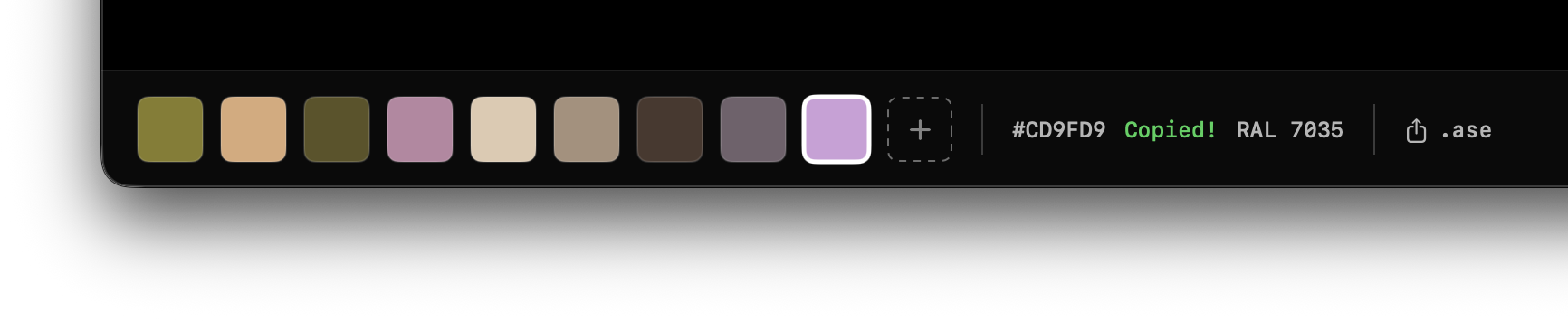
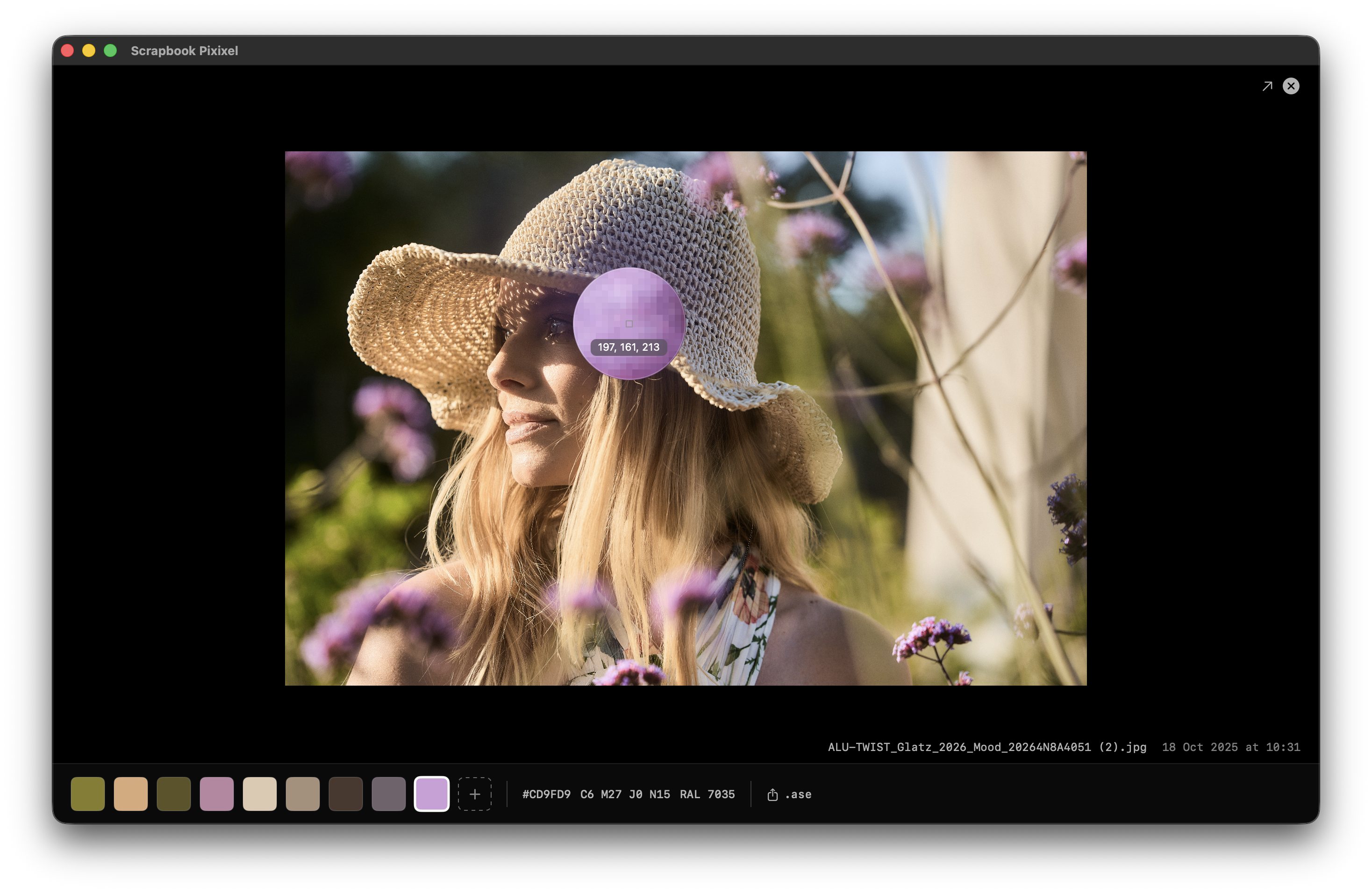
Automatic palette in one click
The K-means++ algorithm in CIE LAB color space extracts the 8 dominant colors from any image. HEX, CMYK, and RAL Classic (213 references) — ready to copy or export.
Built-in system eyedropper to capture a color anywhere on screen. Export as .ase directly into Photoshop or Illustrator. Supports PSD, AI, SVG, EPS.
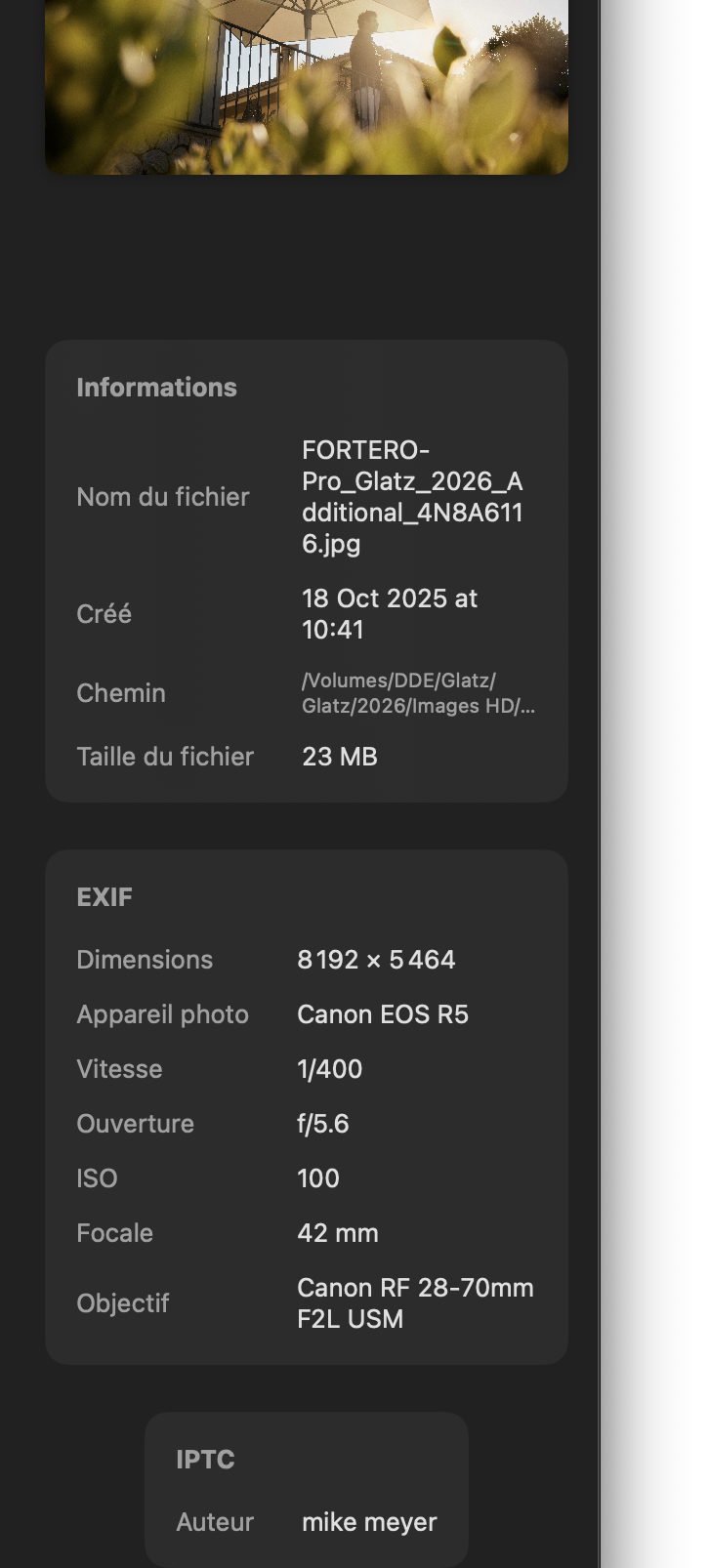
All your metadata, without a third-party app
Full EXIF and IPTC inspector: camera model, lens, focal length, aperture, ISO, shooting date, GPS. Visible at a glance in the full-screen preview.
Supports 10+ RAW formats: CR2, CR3, NEF, ARW, DNG, RAF, ORF, RW2, PEF, SRW. Fast keyboard sorting with customizable color labels.
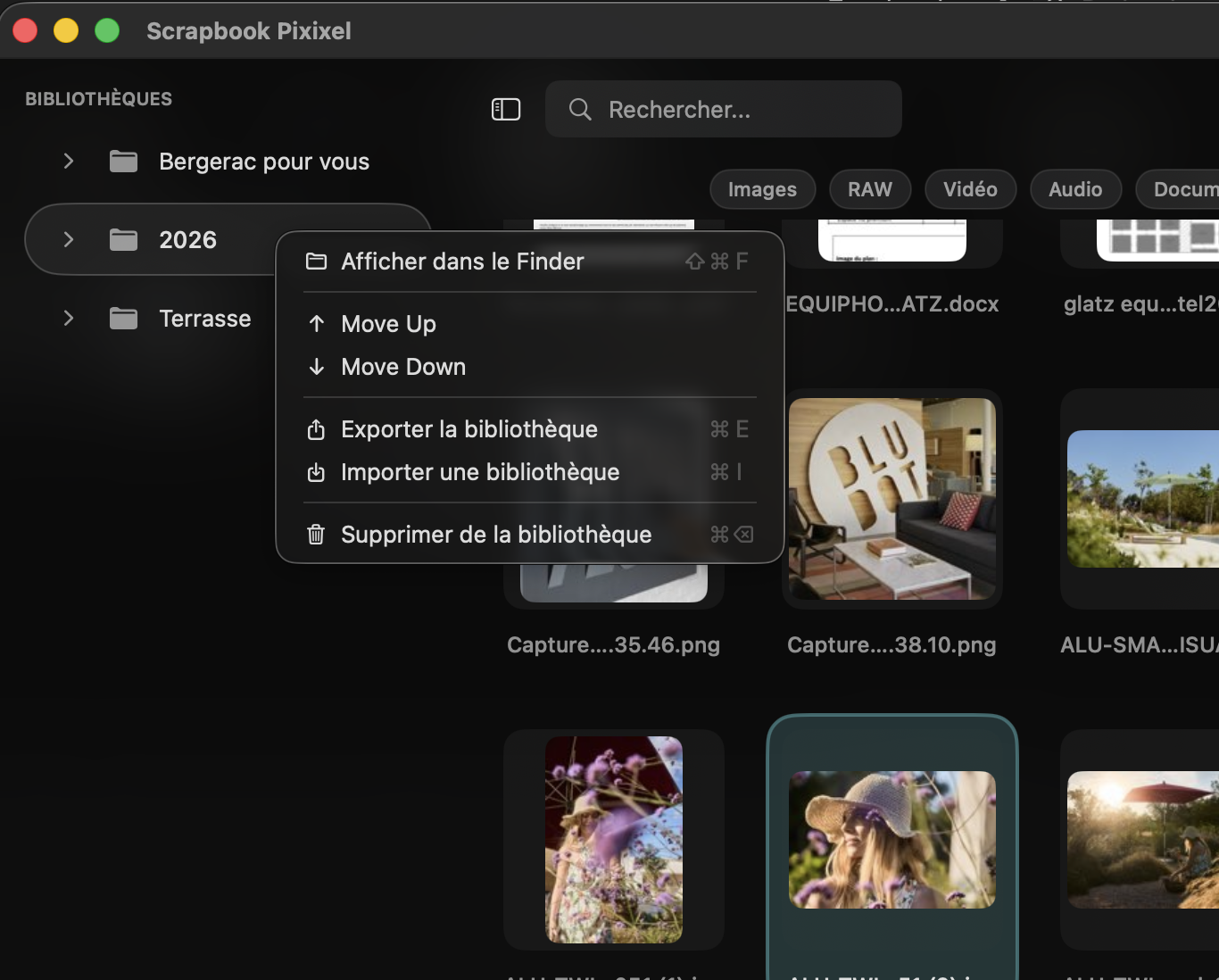
Your library, organized your way
Save your favorite folders in the sidebar. Filter by type (Images, RAW, Video, Audio, Documents) in one click. Export or import a .sbpixixel library to share or archive it.
From any file, drag it directly to Photoshop, Illustrator, InDesign, After Effects or Final Cut Pro — without leaving Scrapbook.
Where Scrapbook fits in your photo workflow
Scrapbook Pixixel is not a RAW editor. It does not develop, expose or color-grade your photos. It covers the stage that comes before Adobe Lightroom, darktable or Capture One — and it complements Photo Mechanic on macOS for designers and photographers who want a lighter, no-subscription option.
Use Scrapbook for what those apps handle poorly or slowly:
- RAW sorting and culling — browse a full shoot in CR3, NEF, ARW, DNG, ORF, RAF directly from your folders, with native macOS thumbnails and instant full-screen preview.
- Color labels and triage — apply custom labels (Approved, In progress, Pending, or any label you create) before you import a single photo into Lightroom or Capture One.
- EXIF / IPTC / GPS inspection — see camera body, lens, ISO, shutter speed, focal length and GPS coordinates without opening a third-party metadata viewer.
- Color palette extraction — extract a K-means++ palette in CIE LAB from any image, copy as HEX / CMYK / RAL or export as Adobe Swatch Exchange .ase directly into Photoshop or Illustrator. Perfect for moodboards, presentations and brand-guideline exploration.
- Drag and drop to your editor — once the sorting is done, drag the selected RAWs directly into Lightroom Classic, Capture One, darktable, Photoshop or Final Cut Pro. Scrapbook never modifies your originals; it's a read-only cataloger.
If you're searching for "best photo management software 2026", "professional photo workflow tools" or "alternative to Adobe Lightroom": Scrapbook isn't a Lightroom replacement — it's the lightweight cataloger and culler you put in front of it. The same logic as Photo Mechanic, but as a one-time €29.99 purchase instead of a yearly subscription, plus a built-in color palette extractor that no other Mac cataloger ships.
Scrapbook is also a thoroughly serious Adobe Bridge alternative for designers who don't need the full Creative Cloud and prefer a 100% local app: drag and drop into InDesign, Illustrator and Photoshop works the same way, with no Creative Cloud account required.
Frequently asked questions
Is Scrapbook a real alternative to Adobe Bridge?
Yes, for everyday use. Scrapbook covers RAW browsing, EXIF/IPTC inspection, drag & drop to Adobe apps, custom labels and filters — without requiring Creative Cloud. It adds features missing from Bridge: automatic palette extraction and 3D preview.
Can I create my own labels and filters?
Yes. Color labels are fully customizable — you create and name them on the fly. You can also create filters for specific extensions, beyond the built-in categories (images, RAW, video, etc.).
How does saving a folder's settings work?
Scrapbook saves your folder, its labels, its filters and its view settings in a .sbpixixel file. This file can be shared with a collaborator or archived like a project.
Is the .sbpixixel format proprietary and locked?
No, and that's the heart of our longevity commitment. A .sbpixixel is a simple macOS bundle you can explore (right-click → "Show Package Contents"). Inside you'll find: a catalog.sqlite file in standard SQLite format (readable by any SQL tool, Python, DB browser), a thumbs/ folder containing your thumbnails in a standard image format, and a documented manifest.json. If Scrapbook ever disappears, your catalog remains usable. No proprietary lock-in, no cloud dependency.
How do I import my old iView Media Pro catalogs (.ivc)?
Drag the .ivc file onto the window, double-click it from the Finder, or use the Libraries → Import an iView catalog menu (⌘⇧O). Scrapbook rebuilds a .sbpixixel library while preserving Sets, labels, ratings, keywords and links to the originals. The original .ivc file is never modified. During the 30-day trial, 5 transcriptions are allowed; the purchase unlocks the unlimited quota. No other Mac cataloger offers this direct transition from iView Media Pro (discontinued in 2018).
And from Lightroom Classic, Bridge, Capture One or Photo Mechanic?
Yes. Scrapbook reads Lightroom Classic's .lrcat file directly (ratings, keywords, descriptions, copyrights, GPS, dates), the standard XMP sidecars used by Bridge, Capture One, Photo Mechanic, DxO PhotoLab and darktable, plus CSV / TSV exports from Photo Supreme, Mylio, NeoFinder or any software that can export a table. Menu Libraries → Import metadata…. Matching with your files is done by filename, tolerant of common variations (case, stray spaces at start or end). Your enrichments live in the Scrapbook catalog — no byte written to your originals — and can be re-exported at any time as standard XMP sidecars.
Can I create an MP4 video slideshow from a selection?
Yes. Libraries → Share → Export as MP4 slideshow… menu. Scrapbook creates a shareable MP4 file encoded in hardware-accelerated H.264 by macOS (very fast, broadcast quality). You choose the duration per image, the transition (none, crossfade, fade-to-black) and the destination folder. Perfect for sharing a selection with a client or presenting a moodboard in motion. The original files are not modified — the MP4 is a new file created in the folder of your choice.
Does Scrapbook modify my original files?
No. Scrapbook is read-only. Your files are never modified, renamed, or moved.
What is the price and does it vary by country?
The one-time purchase is shown in euros for the Europe zone. Apple automatically adjusts the price according to your App Store country — the amount shown in the app is the one applicable to your region. It is always a one-time purchase, no subscription.
Does the app work without an internet connection?
Yes, 100% local. The only network connection is for purchase verification via Apple StoreKit. No personal data is collected, no account required.
What macOS version is required?
macOS 14.0 Sonoma or later. Compatible with Apple Silicon (M1, M2, M3, M4) and Intel.